Stop Chasing Notifications
Bring connected messages into one workspace, so your next reply does not start with remembering which app someone used.

UNIFIED INBOX
Your next client could be waiting for a reply. Bring your connected conversations and contact history together, so you can follow through without hunting through scattered inboxes.
Unlimited Premium Done-For-You Support Included With Every Paid Plan.
THE MESSAGE IS NOT THE PROBLEM. THE SCATTER IS.
One person emails. Another texts. A third sends a social message. Switching between inboxes turns a simple reply into another interruption. KontactKeeper gives your business a central place to continue the conversation.
Bring connected messages into one workspace, so your next reply does not start with remembering which app someone used.
Use assignment and private internal comments to coordinate replies, so clients do not have to explain the same story to everyone.
Use focused views and filters to spend less time scanning and more time moving the right conversation forward.
THE PERSON. THE HISTORY. THE NEXT STEP.
Review connected email, text, social messages, and internal comments in a contact’s timeline. Choose an available channel for your reply without leaving the thread.
Keep contact information and activity alongside the exchange, so you can pick up the relationship instead of asking people to repeat themselves.
MAKE THE IMPORTANT REPLIES EASIER TO FIND
Filter by opportunity stage or status to focus on active conversations around appointments, proposals, and decisions.
Use last-call-status filters to surface unanswered calls or voicemails, so callbacks have a place in your day.
Focus by contact type or connected channel account instead of scanning every conversation in the business.
THE CALL ENDS. THE CONTEXT STAYS.
Keep call activity beside the messages that led up to it. Review an available recording to hear the details again, or scan its transcript to find the question, objection, or next step you need.
Spend your conversation listening instead of worrying that you will forget what mattered. When it is time to follow up, you have somewhere to look.
Recordings and transcripts appear when enabled and available. Our team will configure the appropriate recording and transcription options for your business.
SPEND YOUR ENERGY ON THE RIGHT RELATIONSHIPS
Review a contact’s activity log alongside their conversation, then use configured engagement scores to spot your hottest leads. Replies, form submissions, appointments, and link clicks can help you decide who deserves your attention next.
Our team will set scoring rules around the actions that matter to your business, so you can prioritize genuine engagement instead of working through a list at random.

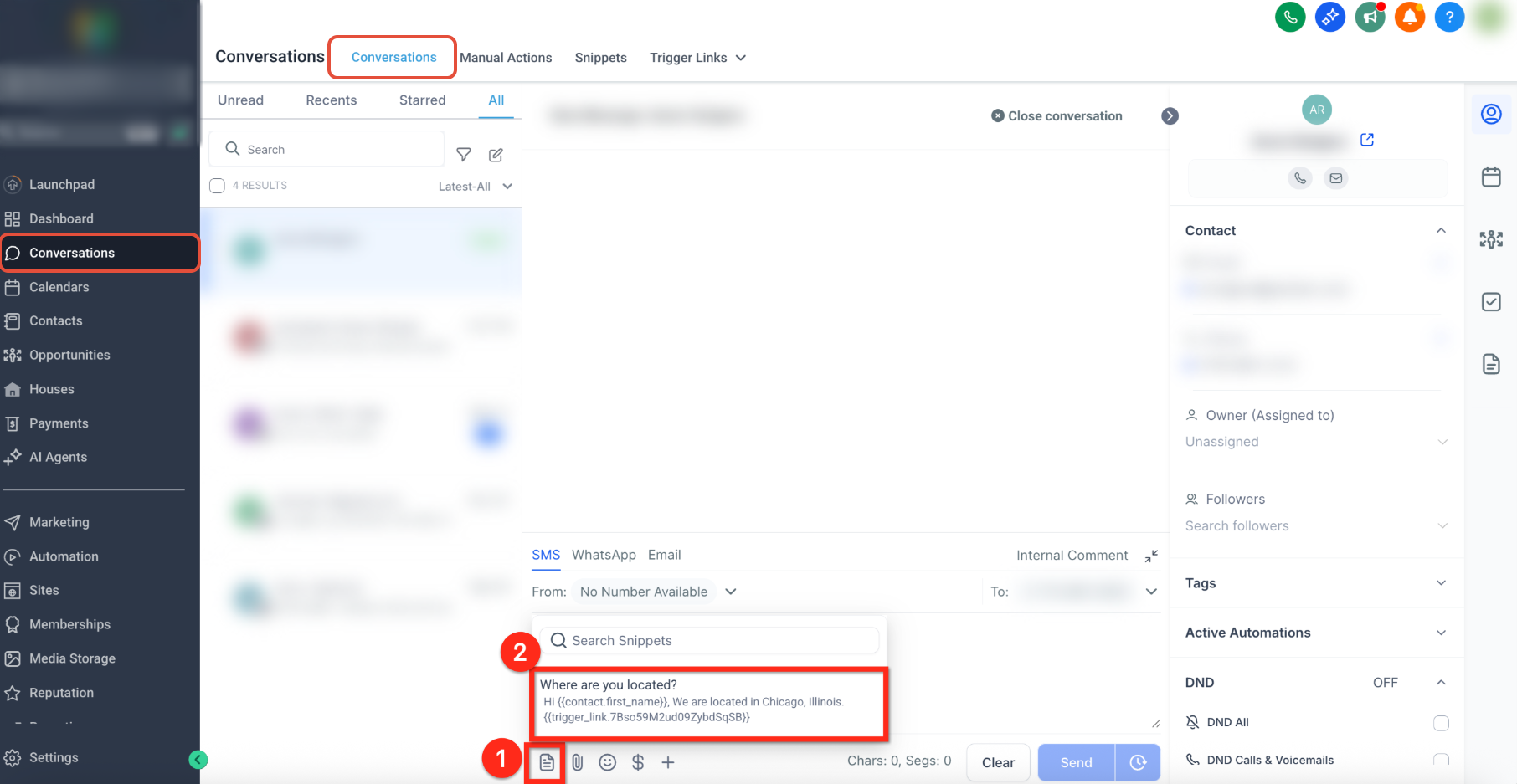
YOUR BEST REPLIES, READY TO REUSE
Save reusable email and text-message templates for the questions you answer again and again. Insert your booking link, directions, pricing next steps, or a helpful resource, personalize the reply, and send it without starting over.
Keep your most useful responses ready for new inquiries, appointment questions, and client support.
Give your team an organized library of approved answers without making every conversation sound identical.
Include reusable links and supported personal details, then review and edit the message before sending.
YOUR PRIORITIES. YOUR VIEW.
Save custom views for VIP clients, ready-to-buy prospects, unanswered inquiries, or your own assigned conversations. Use the tags and filters your business defines, so your day starts with a focused list rather than a wall of messages.
Our team will build your views and tagging rules around your sales process. Administrators can share useful views with the team while keeping each person’s existing access permissions intact.

KEEP MOVING WITHOUT LOSING THE CONVERSATION
Continue conversations from the mobile app. Pull up prepared replies and useful links while you are away from your computer, so a quick answer does not have to wait until you get back to the office.
Use your saved message snippets and supported personal details from mobile Conversations instead of retyping a long answer on your phone.
Review available call recordings and transcripts in mobile Conversations, so you can return to the relationship with the context in hand.
A TEAM THAT FEELS CONNECTED
Add private internal comments and tag the right teammate with an @mention, so your next step reaches the person who can act on it. These notes stay inside your team, not in the client’s inbox. Give each conversation an owner and pass the context along without another screenshot or separate explanation.
Give an inquiry a clear next step before you get pulled into the next task. Keep the conversation close to the person and opportunity it belongs to.
Keep prospective students’ questions and client conversations easier to find, so you can spend more energy teaching and serving.
Coordinate the next reply without passing screenshots around. Give the right person the context to respond with care.
LESS SOFTWARE TO HOLD TOGETHER
Already paying for a separate shared inbox? Bring the messaging work KontactKeeper covers into the same system as your contacts and follow-up. Our team will review your current setup, connect the channels you need, and identify the tools you can consolidate.
You do not need to buy another standalone inbox just to keep your team’s conversations organized. Compare what you use today with the system we will build for you.
Calculate My Subscription SavingsOur team will connect supported channels, configure your inbox views, and set up your team’s access and follow-up workflows. You provide the account access and business direction. We handle the setup inside KontactKeeper.
Unlimited Support. Unlimited Done-For-You Requests.
Included At No Extra Cost With Every Paid KontactKeeper Plan.
Yes. Assign conversations and collaborate through private comments. Team visibility follows the access you give each user, so your team can work with the conversations appropriate to their role.
Connect the supported business channels you use. Our team will configure the connections and available messaging options with you. Channel permissions, messaging rules, and any channel or usage charges still apply.
No. Premium Done-For-You Support is included with every paid KontactKeeper plan. Our specialists will configure the system around your business, with 24/7 human chat, Zoom, and ticket support available.
BUILD A BUSINESS THAT FOLLOWS THROUGH
Bring your conversations together with a team ready to complete the setup.
Get Started With KontactKeeperKEEP EXPLORING KONTACTKEEPER
Each part of KontactKeeper connects to the next, so the work you start in one place keeps moving in another.
Let your business answer the phone, book the next step, and free you from every ring.
Learn moreCreate with AI, schedule ahead, and see what works — without making posting another full-time job.
Learn moreSee what needs your attention first, and choose your next move with confidence.
Learn more